WordPress SEO means improving a WordPress website so search engines can find it, understand it, and rank it in search results.
WordPress already supports many SEO basics. It allows clean URLs, flexible page structure, and easy content publishing. These features help search engines crawl and index pages more easily. But good rankings do not happen by default. A WordPress site still needs the right setup. Technical settings, internal links, and well written content all play a role.
WordPress is widely used across the web. According to W3Techs, WordPress powers over 43 percent of all websites on the internet. Because of this, search engines understand the platform very well.
In this guide, you will learn how WordPress SEO works in practice. We will explain the structure behind it, common mistakes, and the steps that help websites grow traffic over time.
WordPress SEO is the process of improving a WordPress website so search engines can crawl it, understand its content, and show its pages in search results. It usually includes technical setup, content optimization, internal linking, and structured data. When these elements are configured properly, search engines can index pages more easily and users can find the website through relevant searches.
WordPress SEO is the process of optimizing a WordPress website so it ranks higher in search engines like Google. This usually involves improving page titles, URLs, internal links, site speed, and content quality. The goal is to make pages easier for search engines to understand and easier for people to find.
WordPress is designed for publishing content. Because of this, its structure already supports many SEO basics.
It allows clean URL structures, simple content organization, and easy editing of page titles and descriptions. SEO plugins can also generate sitemaps and schema markup, which help search engines understand website content more clearly.
WordPress works well for search engines because its structure is simple and organized. Pages, posts, and categories follow a clear hierarchy. This makes it easier for search engines to crawl a site and understand how content is connected.
The platform also gives full control over URLs, metadata, and internal links. When these elements are set correctly, search engines can index pages faster and understand their purpose more clearly.
WordPress organizes content using posts, pages, categories, and tags. This structure creates a clear hierarchy for both users and search engines. When pages are grouped correctly, search engines can understand which topics a website covers. This improves crawling and helps search engines discover new content more easily. A well structured site also spreads internal link authority across important pages.
WordPress allows full control over page URLs. Site owners can create short and descriptive permalinks that include important keywords.
For example, a clean URL like:example.com/wordpress-seo-guide is easier for both users and search engines to understand. Clear URLs improve readability and help search engines identify the topic of a page.
WordPress was built for publishing content. New posts and pages can be added quickly, and search engines can detect these updates through sitemaps and internal links. Many SEO plugins automatically generate XML sitemaps. These sitemaps help search engines find and index new pages faster. Regular publishing also sends freshness signals, which can help maintain visibility in search results.
WordPress SEO works through several layers. Each layer affects how search engines crawl, understand, and rank a website.
These layers include the core platform, the theme, installed plugins, and the way content is organized. When these parts work well together, search engines can read the site more clearly and index pages without problems. Understanding this structure helps explain why some WordPress sites rank easily while others struggle.
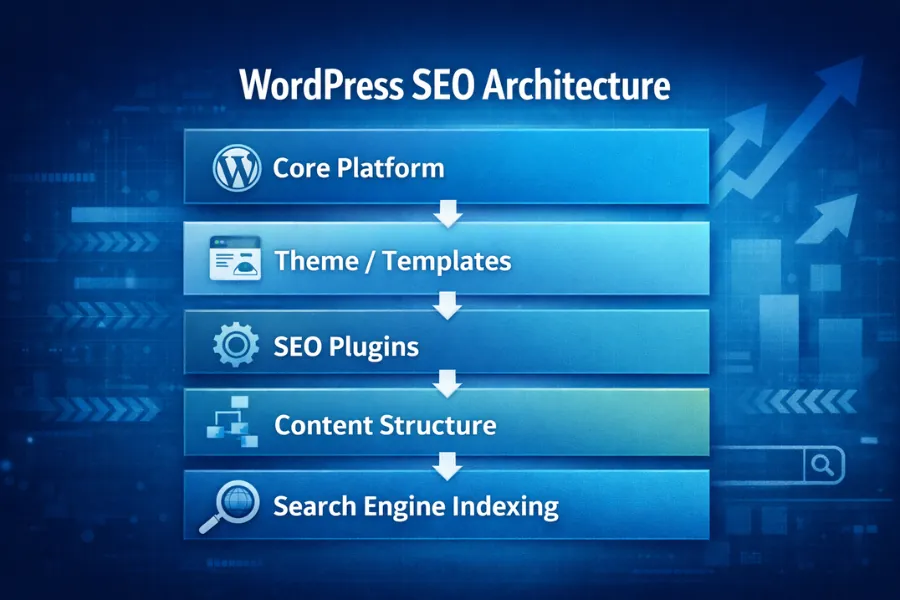
The WordPress core provides the basic structure of a website. It manages how pages are created, stored, and displayed.
It also controls important elements like URLs, post types, and page hierarchy. Because WordPress uses a clean database structure, search engines can crawl and interpret content more easily. This core system is one reason WordPress is widely used for SEO focused websites.
A WordPress theme controls how content appears on the page. But it also affects how search engines read that content.
Good themes use proper HTML structure. They place headings in the correct order and load pages quickly. This helps search engines understand page sections and improves user experience. Poorly built themes can slow down a website or create messy page structure, which can hurt rankings.
Plugins add extra features to WordPress. Many SEO improvements come from plugins.
SEO plugins can manage page titles, meta descriptions, schema markup, and XML sitemaps. These elements help search engines understand what each page is about. Plugins can also improve site speed, security, and caching. All of these factors influence search visibility.
WordPress organizes content using categories and tags. This system is called taxonomy.
Categories group related topics together. Tags connect smaller ideas across different posts. When used properly, they create a clear content structure. A strong taxonomy helps search engines understand how pages relate to each other. It also improves internal linking and makes navigation easier for visitors.
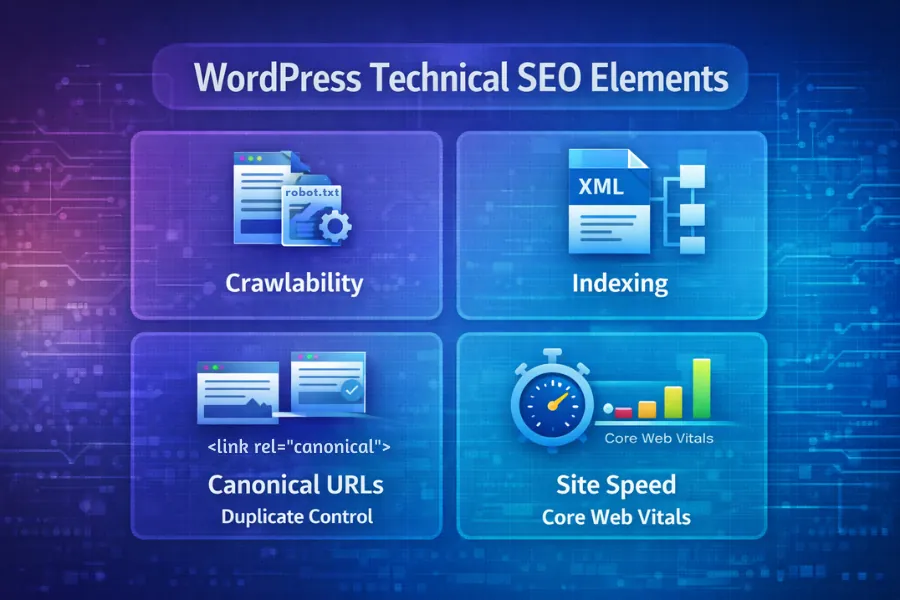
Technical SEO helps search engines access and understand your website. If the technical setup is wrong, even good content may not appear in search results. WordPress allows control over many technical settings. These include visibility settings, sitemaps, crawl rules, and canonical URLs. When these are configured properly, search engines can crawl and index pages more efficiently.
WordPress includes a simple setting that controls whether search engines can index the site.
In the reading settings, there is an option called Discourage search engines from indexing this site . If this option is checked, search engines may avoid indexing the website. This setting is often used during website development. Once the site is ready, it should be disabled so search engines can crawl the pages.
An XML sitemap is a file that lists the important pages of a website. It helps search engines discover new or updated content. Most WordPress SEO plugins generate a sitemap automatically. This file is then submitted to tools like Google Search Console. Google uses the sitemap as a guide when crawling the website. It helps search engines find pages faster and understand the site structure.
The robots.txt file tells search engines which parts of a website they can crawl and which areas should be ignored.
For example, admin pages or system folders are often blocked from crawling. This prevents search engines from wasting resources on pages that should not appear in search results. A properly configured robots file helps search engines focus on important pages.
Sometimes the same content can appear under multiple URLs. This creates duplicate pages that confuse search engines. A canonical URL tells search engines which version of a page is the main one. WordPress SEO plugins usually add canonical tags automatically. Using canonical tags helps search engines understand which page should rank and prevents duplicate content issues.

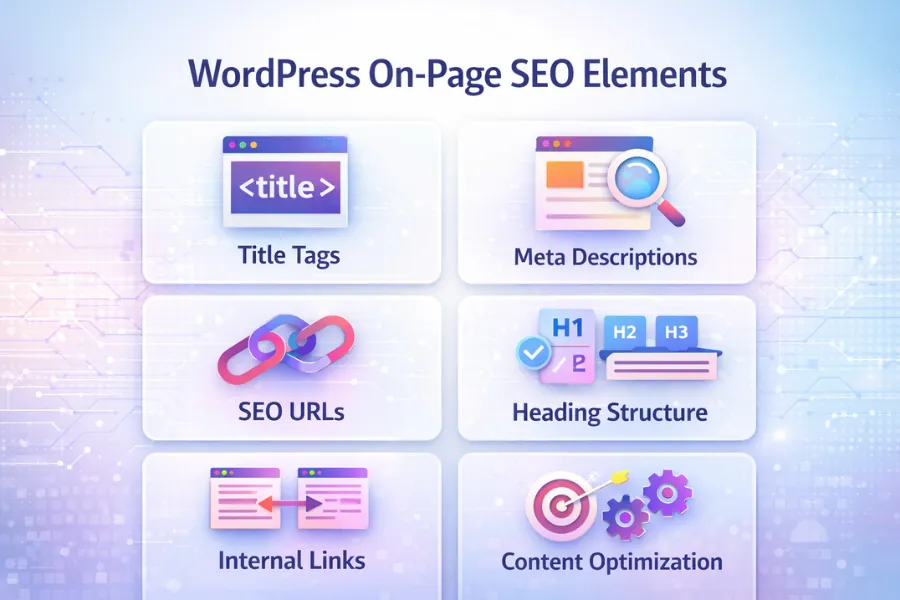
On-page SEO focuses on the elements inside a page. These include titles, URLs, headings, and internal links. When these parts are clear and organized, search engines can understand the page topic more easily.
WordPress makes it simple to control these elements. Site owners can edit page titles, adjust URL slugs, and structure content with headings. These small improvements help search engines read the page and match it with relevant searches.
The title tag is one of the most important on-page SEO elements. It tells search engines what the page is about. A clear title usually includes the main keyword and describes the topic in simple terms. For example, a page about WordPress SEO should mention the keyword directly in the title.
Meta descriptions do not directly affect rankings. However, they help people understand what the page offers before clicking the result. A clear description can improve click through rates in search results.
WordPress allows you to control the structure of page URLs. These URLs are called permalinks. Short and descriptive URLs help both users and search engines understand the page topic. For example, a clean URL like: example.com/wordpress-seo-guide is easier to read than a long URL with numbers or random characters. Using simple words in the URL also helps search engines recognize the subject of the page.
Headings organize the content on a page. They help readers scan the article and understand the main ideas quickly. A page should normally have one main H1 heading. Subtopics are then divided using H2 and H3 headings.
Search engines also use headings to understand the structure of a page. Clear heading hierarchy makes it easier for search engines to identify important sections and topics.

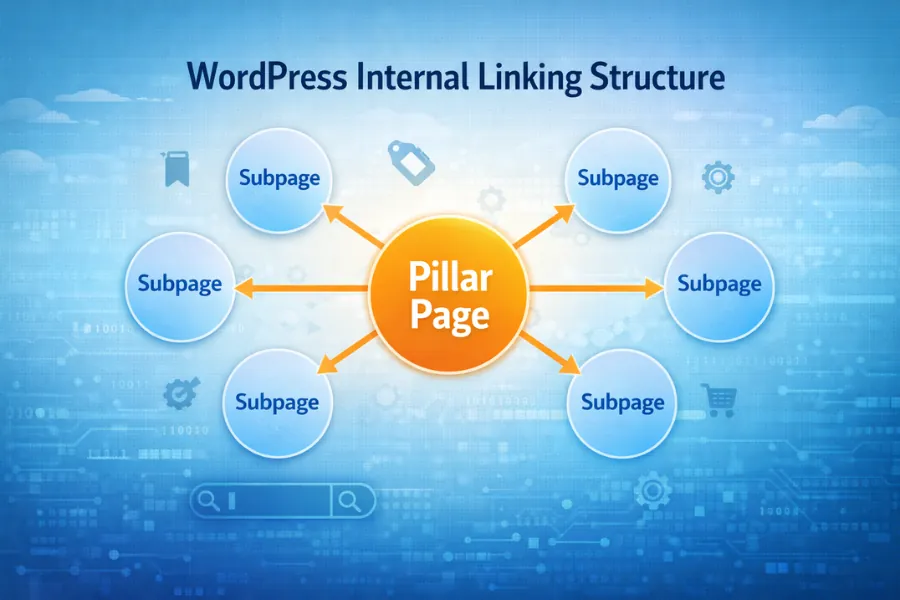
Internal links connect pages within the same website. They help search engines discover related content and understand how pages are connected.
Internal linking is also useful for guiding visitors to deeper pages on the site. As websites grow, managing internal links becomes more complex, and a WordPress SEO consultant can help improve how important pages are connected across the site. When internal links are placed naturally within relevant content, they help distribute authority across the website and strengthen overall site structure.
Plugins extend the features of a WordPress website. Many SEO tasks become easier with the help of plugins. These tools can manage page titles, meta descriptions, XML sitemaps, and schema markup. They also help with technical settings that improve how search engines crawl a website.
WordPress SEO plugins help automate metadata, schema markup, and technical SEO configuration. Official plugin documentation can be found at WordPress Plugin Directory.
Rank Math and Yoast SEO are two of the most widely used SEO plugins for WordPress. Both plugins allow users to control titles, meta descriptions, and XML sitemaps. They also help manage schema markup and indexing settings.
The main difference is in features and interface. Rank Math includes more advanced tools in its free version, while Yoast SEO has been widely used for many years and is known for its simple setup. For most websites, either plugin can support strong SEO if configured properly.
Schema markup helps search engines understand the meaning of a page. It provides structured information about content, such as articles, products, or FAQs. Many WordPress SEO plugins include built in schema features. These tools automatically add structured data to pages without requiring manual coding. When schema is implemented correctly, search engines can display enhanced results like rich snippets, review stars, or FAQ sections.
Website speed is an important ranking factor. Slow pages can affect both user experience and search visibility. Performance plugins help improve loading speed through caching, file optimization, and image compression. Faster websites allow search engines to crawl more pages and reduce bounce rates from visitors. Common optimization methods include page caching, reducing file size, and limiting unnecessary scripts.
WordPress gives strong SEO tools, but mistakes can still happen. Many websites lose traffic because of small technical issues that are easy to miss. Problems like blocked indexing, duplicate pages, slow themes, or too many plugins can confuse search engines. When these issues appear, search engines may crawl fewer pages or fail to understand the site structure.
Fixing these mistakes often improves crawling, indexing, and overall search visibility. In many cases, these issues build up over time and need a structured approach to fix them properly, which is where working with a WordPress SEO consultant can help prioritize what matters first.
One common mistake happens in the WordPress reading settings. There is an option called Discourage search engines from indexing this site . This setting is useful while a site is being built. But if it stays enabled after launch, search engines may avoid crawling the website.
As a result, pages may not appear in search results even if the content is published.
WordPress automatically creates archive pages for categories, tags, authors, and dates. These pages sometimes repeat the same content that appears on the main post pages.
If many similar pages exist, search engines may see them as duplicate content. This can dilute ranking signals and make it harder for the main page to rank. Proper indexing rules or canonical tags can help prevent this issue.
Some WordPress themes and visual page builders add large amounts of code to each page. This extra code can slow down loading speed.
Slow websites create poor user experience and may reduce search visibility. Google has also confirmed that page speed and Core Web Vitals are part of ranking signals. Choosing a lightweight theme and optimizing page performance can help maintain fast loading times.
Plugins add useful features, but too many plugins can create problems. Each plugin loads additional scripts and functions. When many plugins run at the same time, they can slow the site or cause conflicts with other tools. A better approach is to keep only the plugins that are truly necessary and remove unused ones.
Many website owners struggle with local search visibility due to technical mistakes in site structure. Understanding local SEO optimization can help ensure WordPress sites rank for geographically targeted searches.
Search engines are changing. AI systems now help generate answers directly in search results. Tools like Google’s AI Overviews and other large language models read web pages differently than traditional search crawlers. These systems look for clear structure and well explained information. When content is organized properly, AI tools can understand the topic and extract useful answers. Because WordPress gives strong control over page structure and schema markup, it can work well for AI driven search when pages are organized clearly.
AI systems work best with content that is clearly structured. This means using proper headings, short paragraphs, and clear topic sections. When a page follows a logical structure, AI models can identify definitions, explanations, and key ideas more easily. Breaking content into sections with clear headings also helps search engines extract answers for featured snippets and AI summaries.
Schema markup provides structured data about a page. It tells search engines what the content represents, such as an article, FAQ, or guide.
This extra information helps search engines interpret the meaning of the page more accurately. For example, FAQ schema can help search engines recognize question and answer sections. When schema is implemented correctly, search engines can display richer results and better understand the page topic.
Websites that rank well in AI search results usually follow a few simple practices. They publish clear content, organize topics logically, and use structured data where needed. WordPress makes this easier because plugins can generate schema markup and manage page structure automatically. As AI search grows, websites that focus on clear explanations and organized information are more likely to appear in search answers.

Strong WordPress SEO usually comes from a mix of good content, solid technical setup, and trusted authority signals. These elements work together to help search engines understand a website and show it to the right audience. Focusing on these areas helps improve both search visibility and user experience. Over time, consistent improvements can help a website grow steady organic traffic.
Content is one of the most important parts of SEO. Each page should focus on a clear topic and answer real questions people search for. Using simple language, clear headings, and helpful explanations makes the content easier to read. Search engines also rely on this structure to understand the page.
Updating older articles and adding new information can also help maintain visibility in search results.
Technical performance affects both search engines and visitors. Fast loading pages create a better user experience and allow search engines to crawl more content. Improving performance usually involves optimizing images, using caching, and reducing unnecessary scripts.
Google has also confirmed that page experience signals, including Core Web Vitals, play a role in search rankings. Faster websites often perform better in search results.
Backlinks help search engines measure trust. When other websites link to a page, it signals that the content may be useful or reliable. Backlinks often appear naturally when content provides helpful information or solves a common problem.
For stores using WooCommerce, advanced optimization strategies often overlap with eCommerce SEO optimization. This type of SEO focuses on product pages, technical performance, and structured data for online stores.
Many website owners compare WordPress with other platforms before choosing how to build a site. Different systems offer different levels of SEO control.
WordPress is known for flexibility. Site owners can adjust URLs, add plugins, and control technical settings more easily. Other platforms may simplify website management, but they sometimes limit deeper SEO customization. Understanding these differences helps businesses choose the platform that fits their goals.
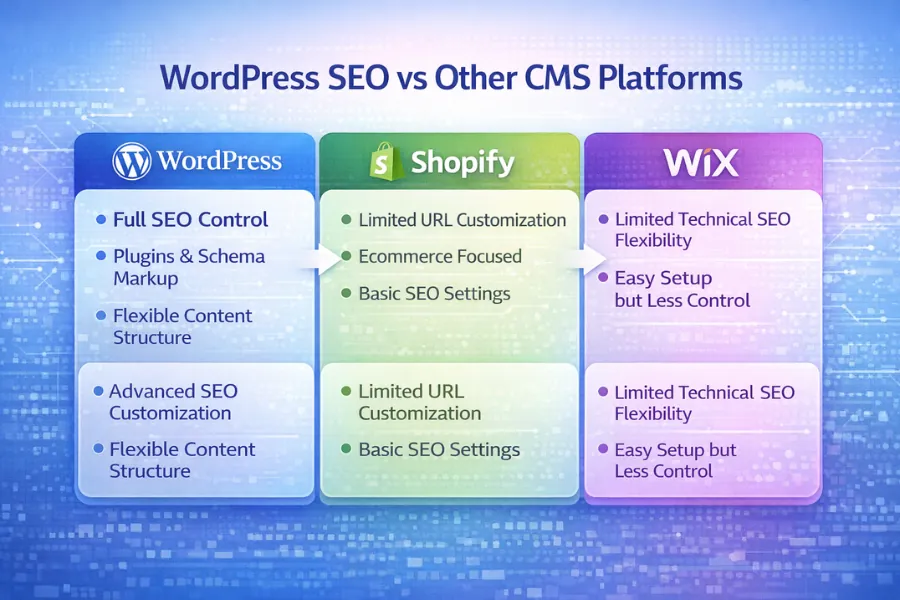
Shopify is designed mainly for ecommerce websites. It includes built in tools for products, payments, and store management.
WordPress, especially when used with WooCommerce, gives more control over technical SEO settings. Site owners can adjust URLs, install different SEO plugins, and modify page structure more freely. For stores that rely heavily on organic traffic, some strategies often overlap with Shopify SEO optimization practices used to improve product visibility in search results.
Wix is a website builder focused on simplicity. It allows users to design websites quickly without technical knowledge. However, WordPress usually offers more flexibility for SEO. Site owners can customize themes, install different plugins, and control deeper technical settings.
Wix continues to improve its SEO tools, but WordPress still provides greater control for websites that rely strongly on organic search traffic. Some businesses also explore platform specific strategies like Wix SEO optimization when working within the Wix system.
WordPress is one type of content management system. Other CMS platforms include systems used for ecommerce stores, website builders, or custom publishing platforms. The main difference usually comes down to flexibility and control. WordPress allows deeper customization through themes, plugins, and technical settings.
Understanding how these platforms influence search visibility is part of a broader concept often explained through CMS SEO architecture. This helps show how different systems affect crawling, indexing, and page structure.
WordPress is considered SEO friendly because it allows full control over page structure, URLs, and content organization. Users can easily edit titles, headings, and metadata. Plugins can also generate XML sitemaps and schema markup. These features help search engines crawl pages and understand the content more clearly.
WordPress SEO usually takes a few weeks to several months to show clear results. The timing depends on website age, competition, and content quality. Technical fixes may improve indexing quickly, but ranking improvements often take longer as search engines evaluate the site.
WordPress pages can rank without backlinks for low competition searches. This usually happens when the topic is very specific and the content answers the question clearly. However, competitive keywords often require backlinks and strong topical authority to reach higher positions.
WordPress often provides more SEO flexibility than Shopify. It allows deeper control over URLs, plugins, schema markup, and site structure. Shopify includes built-in ecommerce tools, but some technical SEO settings are more limited compared with WordPress.
Yes. WordPress is widely considered an SEO friendly platform. It allows control over URLs, page titles, headings, and internal links. Plugins can also generate XML sitemaps and schema markup. When a WordPress site is set up properly, search engines can crawl and understand its pages more easily.
WordPress can run without an SEO plugin, but plugins make optimization easier. Tools like Rank Math or Yoast SEO help manage page titles, meta descriptions, XML sitemaps, and schema markup. These features help search engines crawl pages and understand website structure more clearly.
Two of the most widely used SEO plugins are Rank Math and Yoast SEO. Both allow users to manage metadata, create XML sitemaps, and add structured data to pages. The best choice usually depends on personal preference and the features needed for a specific website.
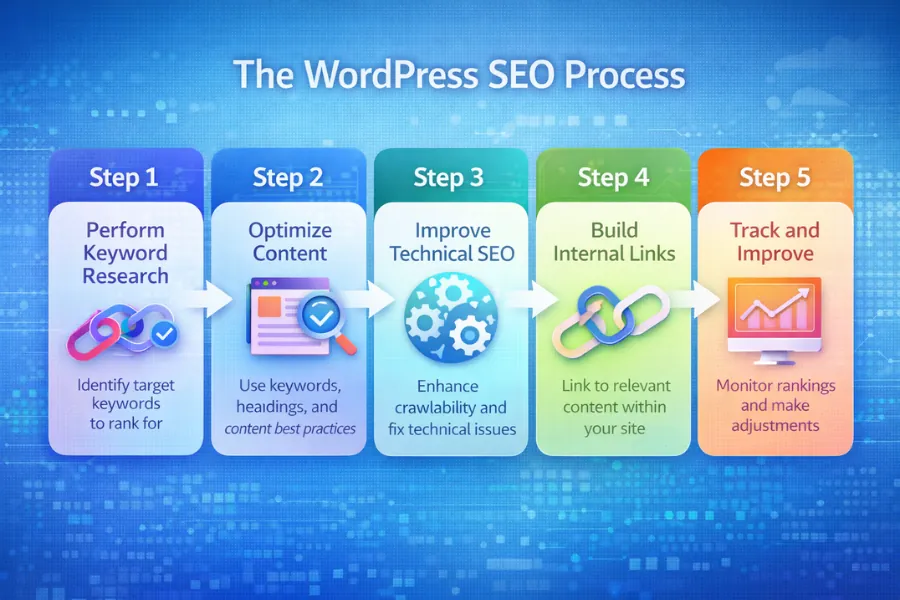
WordPress SEO usually involves several steps. These include setting SEO friendly permalinks, improving page speed, optimizing titles and meta descriptions, using structured data, and building strong internal links. Creating helpful content that answers search questions is also important for ranking.
WordPress often performs well in search results because it allows deeper technical control. Site owners can modify themes, install plugins, and manage SEO settings directly. Website builders like Wix or Shopify simplify setup, but they sometimes limit advanced SEO customization.
Common WordPress SEO mistakes include blocking search engines in site settings, creating duplicate archive pages, using slow themes, and installing too many plugins. Weak internal linking can also limit how search engines discover important pages within the site.