

Wix SEO: Platform Constraints, Ranking Ceilings & Optimization Framework

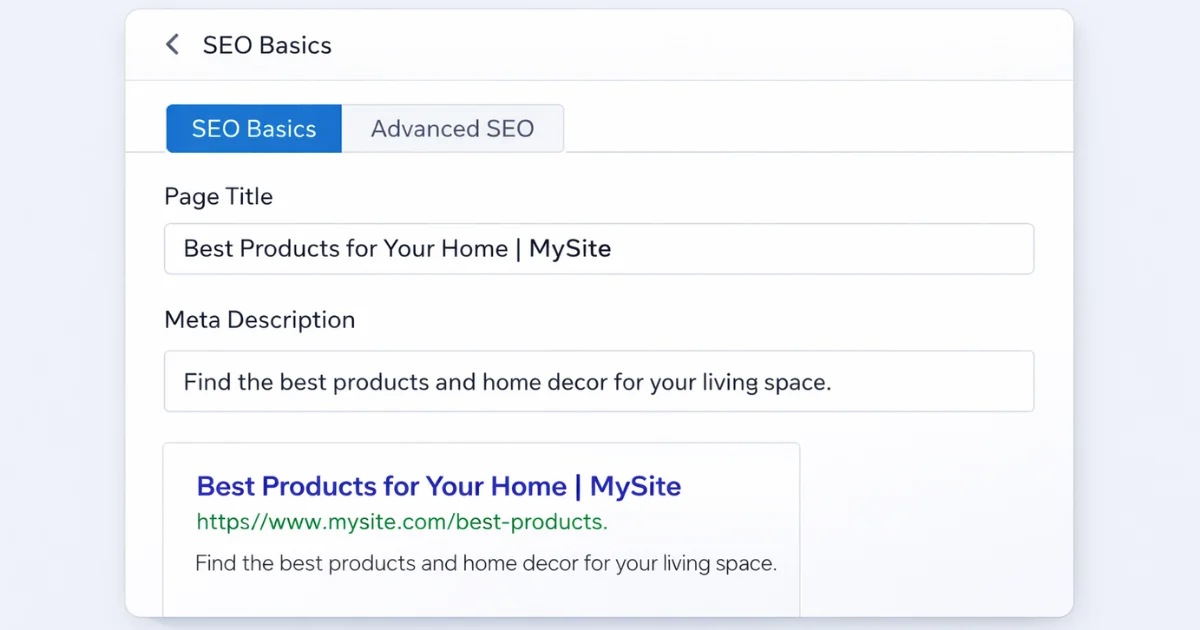
Wix SEO settings panel showing page title, meta description, and Google search preview

Wix SEO is the process of improving a Wix website so it can rank higher in Google search results. It includes optimizing page titles, URLs, internal links, content structure, and technical settings inside the Wix platform.

Wix is a hosted website builder. That means Wix controls the server and many core technical settings. You do not have full system access like you would with an open CMS such as WordPress. This makes Wix easier to manage. But it also creates limits.

Wix sites can rank in Google. In 2021, Google’s John Mueller confirmed that Wix works fine for SEO when set up correctly. Many small business and portfolio websites built on Wix rank well, especially in local search results.

So the real question is not whether Wix can rank.

The real question is how far it can scale before the platform becomes the limit.

This guide explains:

  • How Wix handles technical SEO
  • Where growth usually slows down
  • Why traffic can plateau
  • When optimization is enough
  • When the platform becomes the bottleneck

If your Wix site feels optimized but traffic is stuck, this page will help you understand what is really happening.

What Wix SEO Actually Means

Wix SEO is the process of optimizing a website built on Wix so it can rank higher in Google search results. It includes improving page titles, URLs, internal links, content structure, and technical settings within the Wix platform.

Wix is a hosted website builder. That means Wix controls the server and much of the technical setup. You work inside its system rather than modifying the backend directly. Because of this, Wix SEO is not just about keywords. It is about understanding how the platform shapes visibility, indexing, and long-term growth.

Simple Definition of Wix SEO

Wix SEO is the process of optimizing a website built on Wix so it can rank higher in Google search results. It includes improving page titles, URLs, internal links, content structure, and technical settings within the Wix platform. Unlike plugin-based systems, Wix manages most of the backend for you. You do not control the server or core files.

On open platforms, technical flexibility is much deeper. That difference is central to how CMS SEO works across different systems. Platform structure always affects SEO potential. Wix makes technical setup simpler. But simplicity also means boundaries.

How Wix’s Infrastructure Shapes Search Visibility

Wix is a hosted website builder. Wix controls the server, caching, and many technical defaults. You cannot adjust server-level settings or deeply modify how the system handles requests. This reduces technical mistakes for beginners. But it can limit advanced control.

Large site architecture, custom taxonomy systems, and deep performance tuning are more restricted compared to open platforms. These limits do not stop ranking. Many Wix sites rank well. But infrastructure affects how far and how fast a site can grow.

Hosted Builder vs Open CMS — Why It Matters

A hosted builder like Wix focuses on ease of use. An open CMS gives you deeper technical control and structural freedom. As a site grows, architecture becomes more important than simple on-page edits. Internal linking, content hierarchy, collection structure, and scalability start to matter more. This is especially true for online stores, where eCommerce SEO depends heavily on structured categories, clean navigation, and crawl efficiency.

Open CMS platforms give site owners more control over technical configuration, which is why many high-growth websites build their long-term search strategy around flexible content and technical SEO architecture.

Platform choice does not decide rankings alone. Strategy still matters. But the platform defines how much control you have over that strategy. Wix works well for many projects. Yet every system has limits. Understanding those limits is what turns basic optimization into long-term growth planning.

How Wix Handles Technical SEO Under the Hood

Wix handles many technical SEO settings automatically. It generates sitemaps, manages canonical tags, and controls much of the backend structure. This makes it easier to launch a site, but it also limits how much control you have compared to an open CMS.

Because Wix is a hosted platform, you do not manage the server or core files yourself. You work within the tools Wix provides. That means understanding what is automated, what is editable, and where the platform sets boundaries. Technical SEO on Wix is not about complex server tweaks. It is about using the built-in system correctly and avoiding structural mistakes that can slow growth.

Crawlability & Indexing Control in Wix
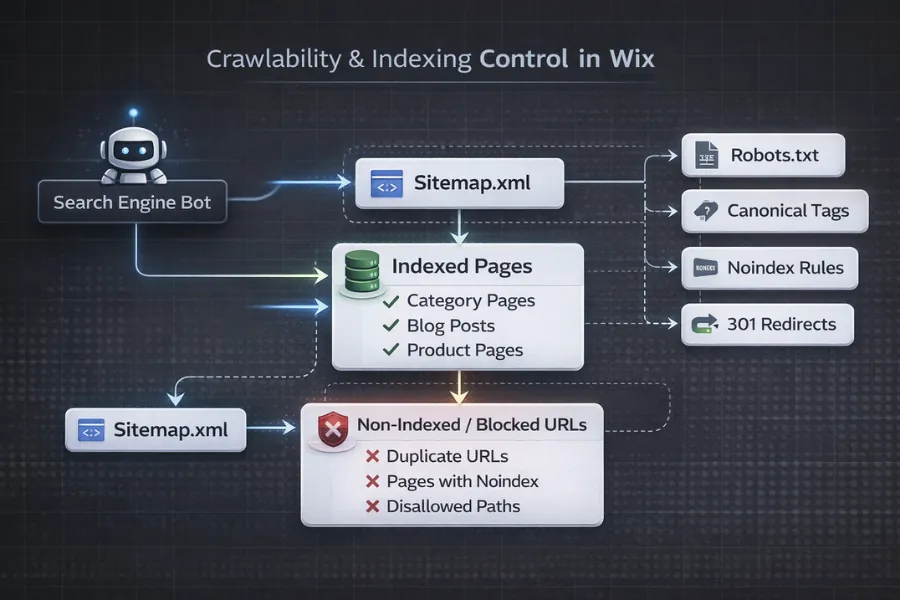
Diagram showing Wix crawlability and indexing control flow including sitemap, indexed pages, non-indexed URLs, robots.txt, canonicals, and redirects

Wix automatically generates an XML sitemap for your site. It updates when you publish new pages. You can submit this sitemap to Google Search Console. You can also set pages to index or noindex inside page settings. However, you do not control robots.txt freely like you would on an open server. Wix provides limited access through its SEO tools.

In most cases, crawl issues are not caused by Wix blocking search engines. They are usually caused by weak internal linking, thin content, or duplicate pages.

URL Structure Rules & Template Restrictions

Wix allows you to edit page URLs. But some structures are fixed. For example, blog posts follow a set folder pattern. Dynamic pages and collections use predefined paths. You cannot fully redesign the URL system.

This matters when building large content hubs or complex site architecture. Clean structure helps Google understand page hierarchy. On Wix, you must plan that structure carefully within its template rules.

Canonicals, Redirects & Duplicate Handling

Wix adds canonical tags automatically to pages. In most cases, this works well. It helps prevent duplicate indexing between similar URLs. You can also create 301 redirects inside the Wix dashboard. This is useful when changing page URLs or removing content.

However, duplicate issues can still appear in blog archives, filtered views, or dynamic pages. You must review these manually to ensure important pages are not competing with each other.

Structured Data Control & Schema Limitations

Wix supports structured data. You can add JSON-LD markup through page settings or custom code sections. For basic schema types like Organization, Article, or Product, this is usually enough. But scaling schema across hundreds of pages can become complex. Automation options are more limited compared to open platforms with plugin ecosystems.

Structured data works on Wix. It just requires more planning when a site grows.

Rendering Behavior & Core Web Vitals Impact

Wix uses modern web technologies and JavaScript rendering. Google can process JavaScript, but it still requires proper structure and clean content output. Performance also depends on template design, image size, and installed apps. Core Web Vitals measure loading speed, visual stability, and responsiveness.

According to Google, page experience signals, including Core Web Vitals, are ranking factors. Wix handles hosting and caching automatically. But heavy layouts, large media files, and third-party scripts can slow pages down. Technical SEO on Wix is not about hacking the system. It is about understanding the system and building within its limits.

The Wix SEO Ceiling (Where Growth Slows Down)

The Wix SEO ceiling is the point where website growth slows because of structural or platform limits. It happens when content improvements no longer produce strong ranking gains, often due to architecture, indexing control, or scalability constraints. This does not mean Wix cannot rank. It means growth depends on how far the platform can support expanding content, structure, and performance needs.
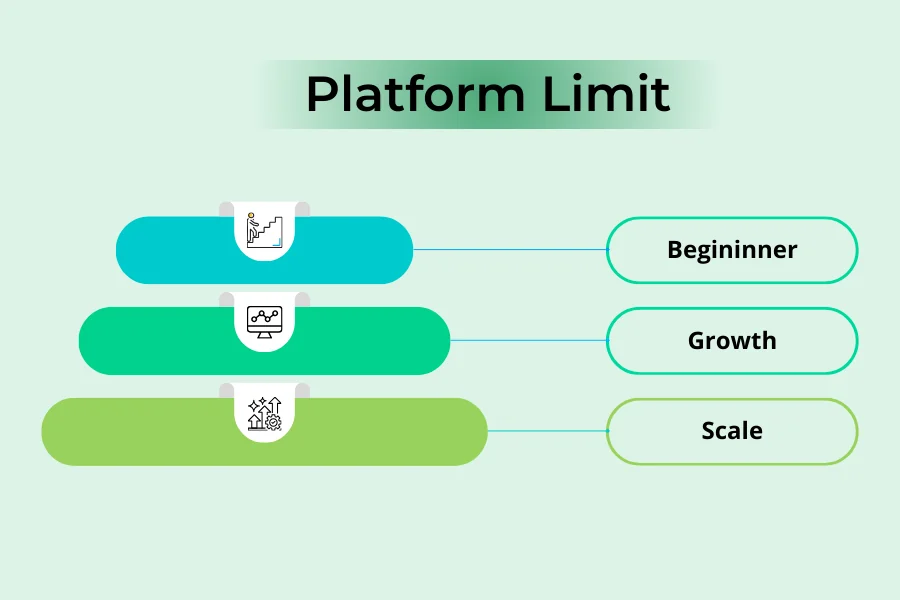
Wix SEO growth stages showing beginner, growth, and scale levels under platform limit

01

Beginner Ceiling — When Basic SEO Is Enough

For small websites, Wix works very well.

If you have:

  • A local business site
  • A portfolio
  • A small blog
  • A small online store

Basic SEO can be enough. Clean titles, clear content, good internal links, and proper indexing settings can drive results. At this level, the platform rarely causes problems. Growth usually depends on content quality and competition

02

Growth Ceiling — Content & Structure Limits

As a site grows, structure becomes more important than simple on-page edits.

You may notice:

  • Traffic increases, then stalls
  • Blog posts rank but category pages do not
  • Important pages are discovered but not indexed
  • Internal linking becomes messy

At this stage, the issue is often architectural. Collections, hierarchy, crawl paths, and page roles need clearer structure. This is where a structured review helps. A systematic process like an eCommerce SEO audit checklist can show whether the problem is content quality or structural limits.

Growth does not stop because Wix is bad. It slows when structure is not strong enough for scale.

03

Scale Ceiling — When Platform Constraints Appear

When a store grows large or content expands heavily, deeper control starts to matter.

You may need:

  • Advanced taxonomy control
  • Automated schema at scale
  • Greater performance optimization
  • Flexible URL architecture

This is where platform boundaries become more visible. Some businesses decide to stay and optimize within Wix. Others choose platforms that allow deeper structural control, especially for large product catalogs. That is where Shopify SEO often becomes part of the conversation.

The key is not emotion. It is structural need.

04

Signs Wix Is Becoming the Bottleneck

Here are common signals:

  • Technical fixes are limited by platform rules
  • Performance improvements reach a ceiling
  • Large content clusters are hard to organize cleanly
  • URL structure cannot match your growth strategy
  • Indexing control feels restricted

If you see these signs, the issue may not be your SEO effort. It may be the system you are working inside. Understanding the ceiling helps you make better decisions. Optimize first. Then evaluate structure. Then consider platform limits.

Common Wix SEO Failures (And Why They Happen)


Most Wix SEO problems are not caused by one big technical error. They are usually structural. Pages get published. Content improves. But rankings do not move. Traffic stays flat. This happens when search engines cannot clearly understand which pages matter most, how they connect, or why they are valuable.

Below are the most common issues seen on growing Wix websites

“Discovered but Not Indexed” on Wix Sites

This status means Google found your page but decided not to index it. In most cases, Wix is not blocking the page. The issue is weak signals. That can include thin content, poor internal linking, or multiple pages covering the same topic.

Google prioritizes pages that show clear purpose, strong internal links, and unique value. If a page does not stand out, it may remain discovered but not indexed. Improving structure often solves this faster than rewriting the page again.

Traffic Plateau Despite Content Publishing

Publishing more content does not always increase traffic. If new posts are not connected to strong category pages or core pages, they stay isolated. Search engines may crawl them, but they do not gain enough authority to rank well.

Growth slows when structure does not support expansion. Clear hierarchy and internal linking are often more important than publishing frequency.

Blog and Dynamic Page Indexing Issues

Wix blogs and dynamic pages use fixed templates. That keeps setup simple. But it can create indexing confusion as content grows. Archive pages, tag pages, and filtered views may compete with main articles. Some dynamic pages may not receive enough internal links. When search engines cannot clearly tell which version is the main page, indexing becomes inconsistent.

Duplicate and Archive Page Conflicts

Duplicate content often appears quietly. Similar pages may exist under different URLs, especially in blogs or filtered sections.

Wix automatically adds canonical tags. That helps reduce duplicate indexing. But structure still needs review. If important pages compete with near-identical versions, rankings can split. A structured review process, such as an eCommerce SEO audit checklist, can help identify where duplication or weak signals are limiting growth.

When Wix SEO Works Extremely Well

Wix SEO works best for small to medium websites with clear structure and focused goals. It performs well when the site does not require deep technical customization or complex architecture. In these cases, simplicity becomes an advantage rather than a limitation.

The platform is strong for local businesses, portfolios, and smaller online stores. When structure is clean and competition is reasonable, Wix can rank consistently.


Local Business and Portfolio Sites

Wix works especially well for small local businesses and personal brands.

If your site has:

  • A few service pages
  • Clear location targeting
  • Limited blog content
  • Simple navigation

Wix can handle this easily.

Local rankings often depend more on relevance, content clarity, and Google Business Profile signals than deep technical customization. In these cases, Wix is usually not the limiting factor. For photographers, consultants, agencies, and small service providers, Wix often provides more than enough SEO control.

Small E-commerce Stores

Wix can also perform well for smaller online stores.

If you have:

  • A limited product catalog
  • Clear collections
  • Focused keyword targeting
  • Strong product descriptions

Wix can support growth.

The most important factor is structure. Categories must be clear. Products must connect logically. Internal linking must guide search engines properly.

As stores grow, structure becomes more important than simple on-page edits. That is where broader eCommerce SEO principles come into play, especially around collection hierarchy and crawl efficiency. For small to medium stores, Wix is often sufficient. The limits usually appear only when scale increases significantly.

Low-Scale Content Sites

For blogs with moderate publishing frequency, Wix works well. If you publish helpful, focused articles and maintain clean internal linking, indexing is usually stable. Wix automatically generates sitemaps and handles many technical settings.

Problems tend to appear only when content volume grows heavily without strong structure. For low-scale content sites, Wix offers enough flexibility to rank consistently, provided the content is clear and organized.

Wix SEO vs WordPress vs Shopify

Platform choice affects how much control you have over SEO. All three can rank well. The difference is how much flexibility you get as the site grows. Wix focuses on simplicity. WordPress focuses on flexibility and deeper technical control through plugins, themes, and customizable structure, which is why many larger websites rely on open CMS search optimization strategies for long-term scalability. Shopify focuses on structured commerce. The right choice depends on scale, complexity, and long-term goals.

Control Over Technical SEO

Wix manages most technical settings automatically. You can edit key elements like titles, descriptions, and indexing rules. But deeper server-level control is limited.

WordPress offers far more technical flexibility. You can adjust themes, plugins, taxonomy systems, and advanced configurations. That is why WordPress SEO often appeals to businesses that need deeper customization.

Shopify sits in the middle. It controls hosting like Wix, but offers stronger structure for commerce-focused sites. Control matters more as complexity increases.

Scalability and Content Architecture

For small websites, Wix structure is usually enough. Pages, collections, and blog posts work well within moderate scale. As content expands, architecture becomes critical. Category systems, internal linking, and crawl paths must be carefully designed.

WordPress allows deeper control over taxonomy and page hierarchy. Shopify provides strong collection-based architecture designed for product catalogs. Scalability is not just about traffic. It is about how cleanly your structure can grow.

Performance at Scale

Wix handles hosting and caching automatically. This reduces setup mistakes. But layout-heavy designs and third-party apps can affect performance.

WordPress performance depends on hosting quality and optimization setup. It can be extremely fast when configured well, but it requires more management.

Shopify is optimized for commerce performance and handles infrastructure internally. Large stores often benefit from this stability.

Performance affects user experience and, according to Google, page experience signals are part of ranking systems.

Long-Term Growth Flexibility

Wix works very well within defined boundaries. For many businesses, those boundaries are never a problem. But when growth demands deeper structural control, businesses often evaluate other platforms.

For large product catalogs and advanced collection strategies, Shopify SEO becomes relevant because of its commerce-focused architecture. For businesses that require maximum customization across content types, WordPress remains one of the most flexible options.

Platform choice does not guarantee rankings. Structure and strategy matter more. But the platform defines how much room you have to grow.

Strategic Framework for Ranking on Wix

Ranking on Wix is not about tricks or shortcuts. It is about structure, clarity, and consistency.

Wix gives you the tools to manage titles, URLs, internal links, and indexing. But long-term growth depends on how you organize your site. Search engines reward clear hierarchy, strong internal connections, and focused page intent. This framework focuses on five core areas that directly influence visibility and scalability.

Structural Page Hierarchy Strategy
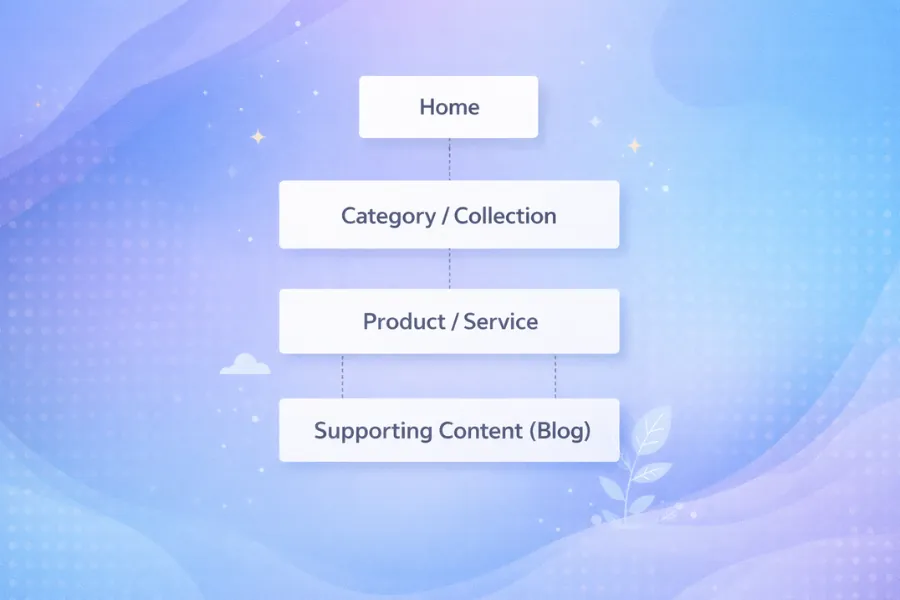
Website page hierarchy structure showing home, category, product, and supporting blog content levels

Every page on your site must have a clear role. Your homepage introduces the main topics. Category or collection pages organize related content. Product and service pages target specific intent. Blog posts support and strengthen core pages.

If this hierarchy is unclear, search engines struggle to understand importance. Important pages should sit higher in the structure and receive the most internal links.

On Wix, structure should be planned before content grows. Fixing weak hierarchy later is much harder than building it correctly from the start. Clear hierarchy helps both users and search engines.

Internal Linking Architecture for Wix
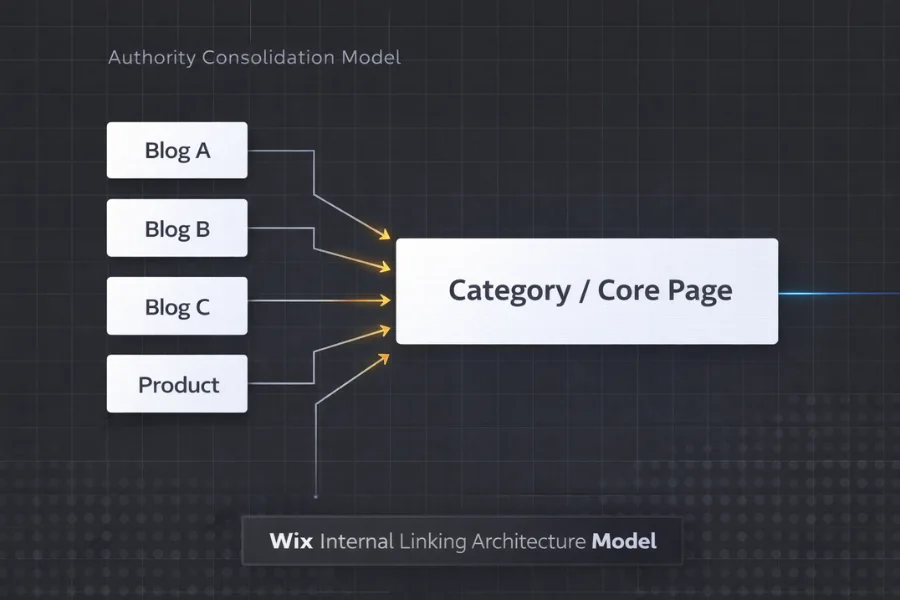
Authority consolidation diagram showing multiple supporting pages linking to a central Wix category or core page

Internal links are one of the strongest ranking signals you control. They show search engines which pages matter most. They also help distribute authority across your site.

Each supporting page should point to a core page. Blog posts should reinforce category or service pages. Product pages should connect clearly to collections. Random linking creates confusion. Strategic linking builds authority.

Wix makes it easy to add links. The real difference comes from linking with purpose and consistency.

Schema Deployment Strategy

Structured data helps search engines understand what a page represents.

Wix allows you to add JSON-LD markup through page settings or custom code. This works well for common schema types such as Organization, Article, Product, and FAQ.

The goal is clarity, not quantity. Schema should match page intent. A product page needs Product schema. A blog post needs Article schema. Clean and accurate markup is more effective than excessive or duplicated markup.

Consistency across similar pages also improves reliability.

Crawl Budget and Indexing Management

Not every page on your site needs to rank. Some pages guide users. Others exist only for navigation. Important pages must be clearly indexable and supported by strong internal links.

Review your indexing settings regularly. Remove or merge weak pages. Avoid creating multiple pages that compete for the same keyword. When structure is clean, search engines crawl more efficiently. Clear indexing signals improve stability and reduce wasted crawl activity.

Content Clustering for Platform Authority

Search engines reward depth around topics. Instead of publishing isolated articles, group related content into clusters. A central page should cover the main topic. Supporting pages should expand on subtopics and link back clearly. This builds topical authority.

Clusters help search engines understand expertise. They also help users move naturally through related information. Authority does not grow from volume alone. It grows from structure, connection, and depth.

Should You Stay on Wix or Migrate?

Wix is not a weak platform. It works very well within defined limits. The real question is whether your goals still fit those limits.

Before thinking about migration, it is important to evaluate structure, performance, and strategy first. The key is knowing whether your growth challenge is strategic or structural.

You should stay on Wix if your site structure supports growth and technical limits are not blocking performance. Migration becomes logical only when platform constraints clearly restrict scalability, indexing control, or structural flexibility. Before changing platforms, evaluate hierarchy, internal linking, and indexing first. Migration should solve a proven limitation, not a temporary slowdown.

Some businesses eventually move to platforms that allow deeper technical customization. In those cases, long-term growth strategies often shift toward flexible CMS optimization frameworks where site owners can control structure, plugins, and advanced optimization settings.

If your growth challenge feels structural and you are unsure whether to optimize or migrate, working with a Wix SEO consultant can help you evaluate the platform limits before making major changes.

When Optimization Is Enough

You should stay on Wix if:

  • Your site is small to medium in size
  • Your structure is clear and organized
  • Performance is stable
  • Traffic is growing steadily

In many cases, growth slows because structure needs improvement, not because the platform has failed. If technical limits are not blocking you, optimization is often the smarter choice. Migration adds cost, time, and risk. It should not be the first solution.

When Migration Is Logical

Migration becomes reasonable when structural limits clearly block growth.

This may happen when:

  • Large product catalogs need deeper taxonomy control
  • Advanced automation or schema scaling is required
  • URL structure must be fully customized
  • Performance improvements have reached a ceiling

At this point, the issue is no longer content or linking. It is platform flexibility. Migration should be based on structural need, not frustration.

Decision Framework for Business Owners

Ask three questions:

  1. Is traffic limited by content quality or by structure?
  2. Are technical improvements still possible within Wix?
  3. Will migration clearly remove a proven constraint?

If the answer is unclear, review your structure first. Many businesses move platforms too early.

If you need an outside perspective to evaluate whether the issue is strategy or system-level limits, working with an experienced eCommerce SEO consultant can help you make a decision based on data rather than assumption.

The goal is not to leave Wix. The goal is to choose the right structure for long-term growth.

Frequently Asked Questions About Wix SEO

Is Wix good for SEO?

Yes, Wix can rank well when used correctly. It supports customizable meta tags, structured data, clean URLs, and indexing controls. However, advanced scalability, deep technical customization, and large-site architecture are more limited compared to open CMS platforms.

Wix websites can rank on Google if they follow proper SEO fundamentals, including keyword targeting, structured internal linking, technical setup, and quality content. Rankings depend more on strategy and structure than on the platform alone.

Basic SEO tools are included in Wix at no extra cost. Users can edit meta titles, descriptions, URLs, and connect to Google Search Console. However, advanced optimization may require additional tools, expertise, or platform-level adjustments.

Wix limits deep server-level control, advanced URL customization, and large-scale architecture flexibility. While suitable for small to medium sites, complex eCommerce, international SEO, or heavy content scaling can expose structural constraints.

Wix is easier to manage but offers less technical control than WordPress. WordPress allows deeper customization, plugin flexibility, and scalable architecture, making it more suitable for complex or high-growth projects.